
Download Windows Configuration Designer – Device Setup, Active Directory, Wi-Fi Configuration, MDM Enrollment, Application Deployment, IT Management
Overview
The Windows Configuration Designer (WCD) is a specialized utility developed by Microsoft to support IT administrators in configuring Windows devices prior to deployment. Designed for enterprise environments, WCD enables the creation of customized device configurations that streamline setup processes across large-scale deployments. By predefining network settings, security policies, application installations, and management enrollment, the tool reduces manual intervention and minimizes configuration errors. Its primary purpose is to enhance operational efficiency in IT departments managing fleets of Windows devices, whether in corporate offices, educational institutions, or government agencies.
WCD addresses key challenges in device onboarding, such as inconsistent configurations, delayed access to essential software, and the complexity of integrating with identity and management systems. The tool is especially valuable in organizations that rely on Active Directory or Azure Active Directory for user and device authentication, as well as those using Mobile Device Management (MDM) platforms for remote monitoring and policy enforcement. Real-world use cases include setting up employee laptops, classroom computers, or kiosk devices with consistent, secure, and policy-compliant configurations from the moment they are powered on.
As a product from Microsoft, WCD benefits from the company’s established reputation in enterprise software and integration with the broader Windows ecosystem. The developer did not provide additional technical details about its architecture or deployment methods. Although the tool has been available since 2016, it remains relevant for organizations that require standardized device provisioning. Its role in the IT management landscape is significant, serving as a foundational component in modern device lifecycle management workflows.
Key Features & Functionality
- Seamless Device Configuration: Administrators can define comprehensive device settings in advance, including regional preferences, user account policies, and system-level configurations. This ensures that every deployed device operates according to organizational standards, reducing variability and support overhead.
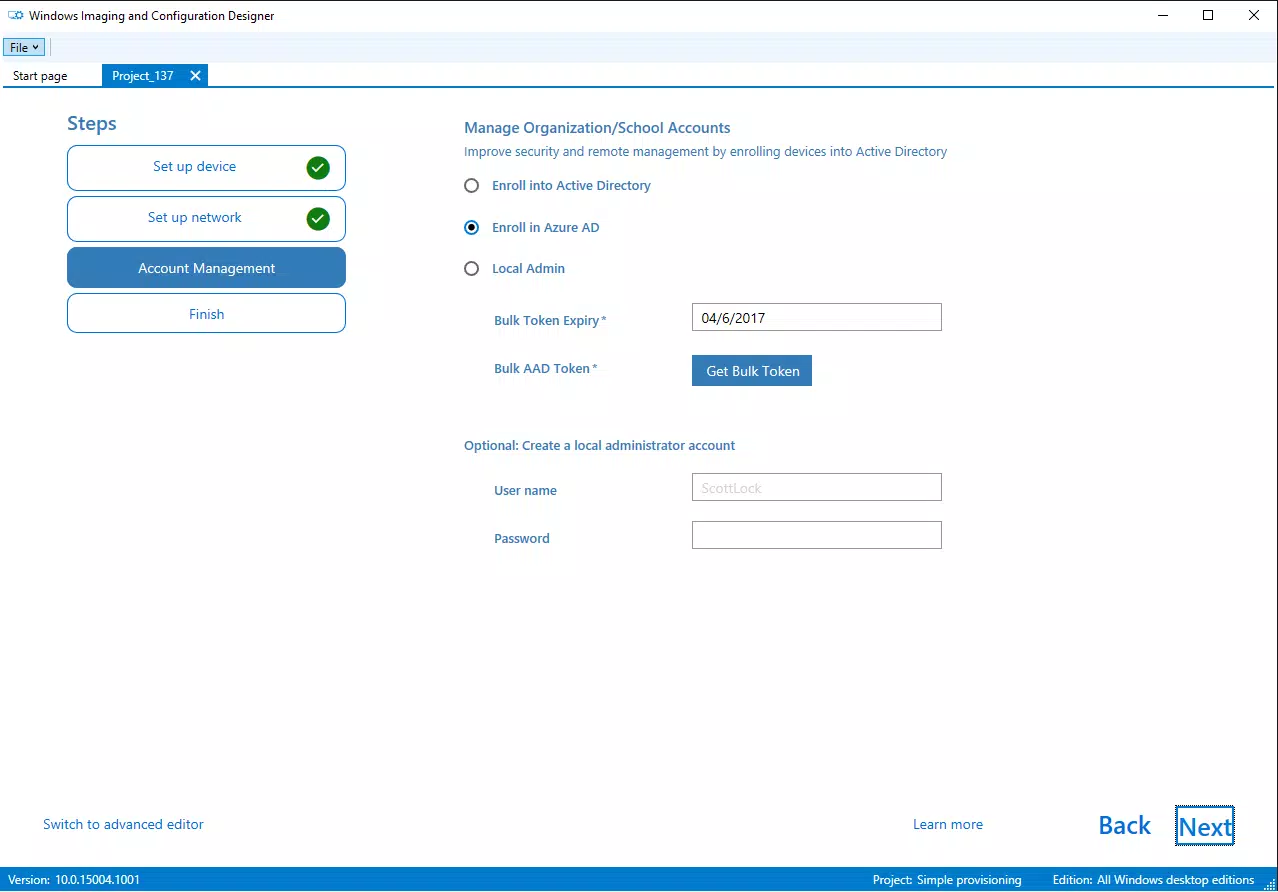
- Active Directory Integration: WCD simplifies the process of joining devices to on-premises or cloud-based Active Directory domains. This enables centralized identity management and policy enforcement, ensuring compliance with security and access control requirements from the initial setup.
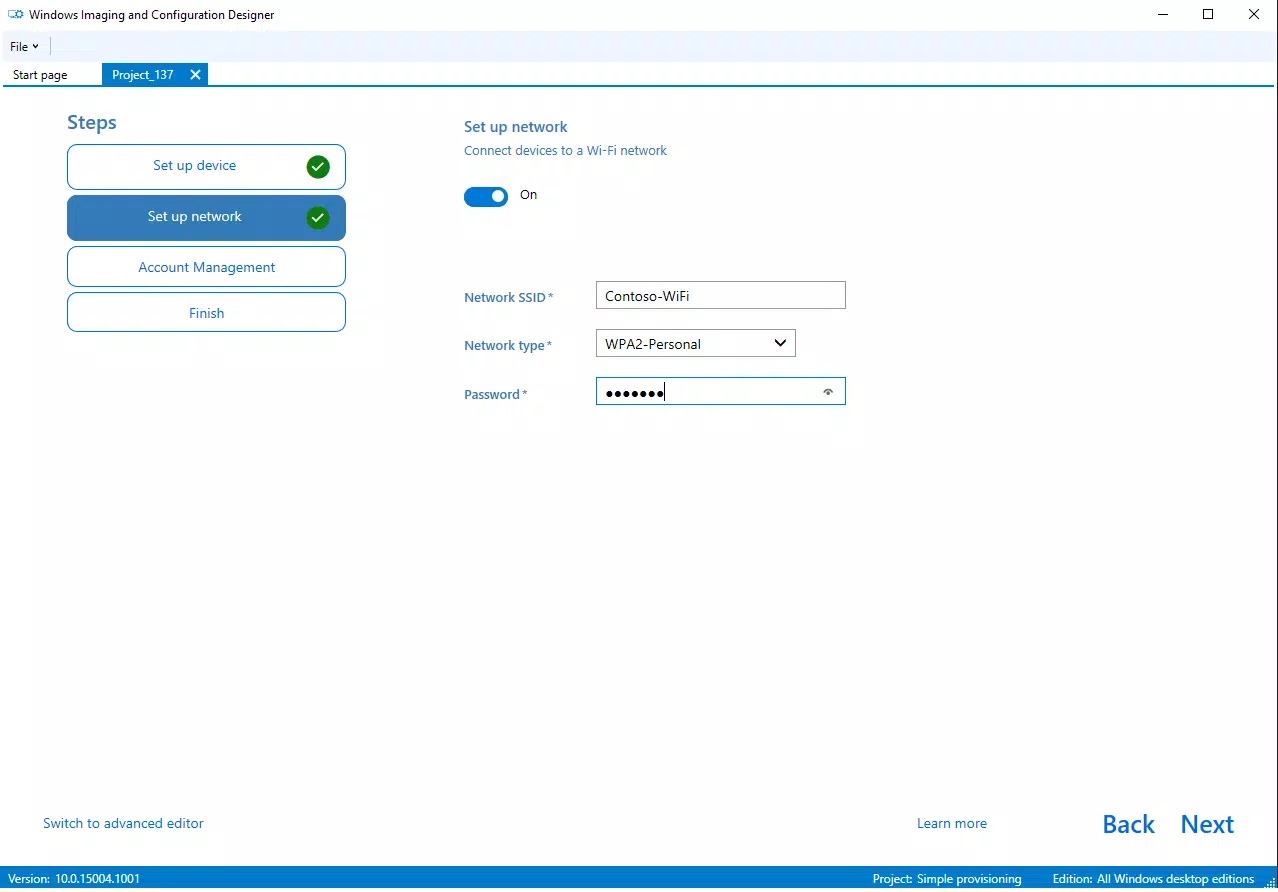
- Wi-Fi Connectivity Setup: The tool allows for the pre-configuration of multiple Wi-Fi profiles, including authentication methods and network credentials. Devices can automatically connect to designated networks upon first boot, eliminating the need for end-users to manually enter sensitive information.
- Effortless Management Enrollment: WCD supports automatic enrollment into MDM solutions such as Microsoft Intune or other third-party platforms. This ensures that devices are immediately monitored, secured, and managed after deployment, which is essential for maintaining compliance and responding to security threats.
- Application Installation Automation: Administrators can specify a list of applications to be installed during the configuration phase. This includes both Microsoft Store apps and traditional desktop software, ensuring that users have immediate access to necessary tools without requiring post-deployment setup.
Each feature is designed to reduce administrative workload and improve consistency across device deployments. For example, a school district can use WCD to configure 500 student laptops with pre-installed educational software, secure Wi-Fi access, and automatic enrollment in the school’s MDM system—all before the devices are handed out. Similarly, a corporate IT team can deploy new employee workstations with company policies, domain membership, and required business applications already in place.
Interface, UX & Performance
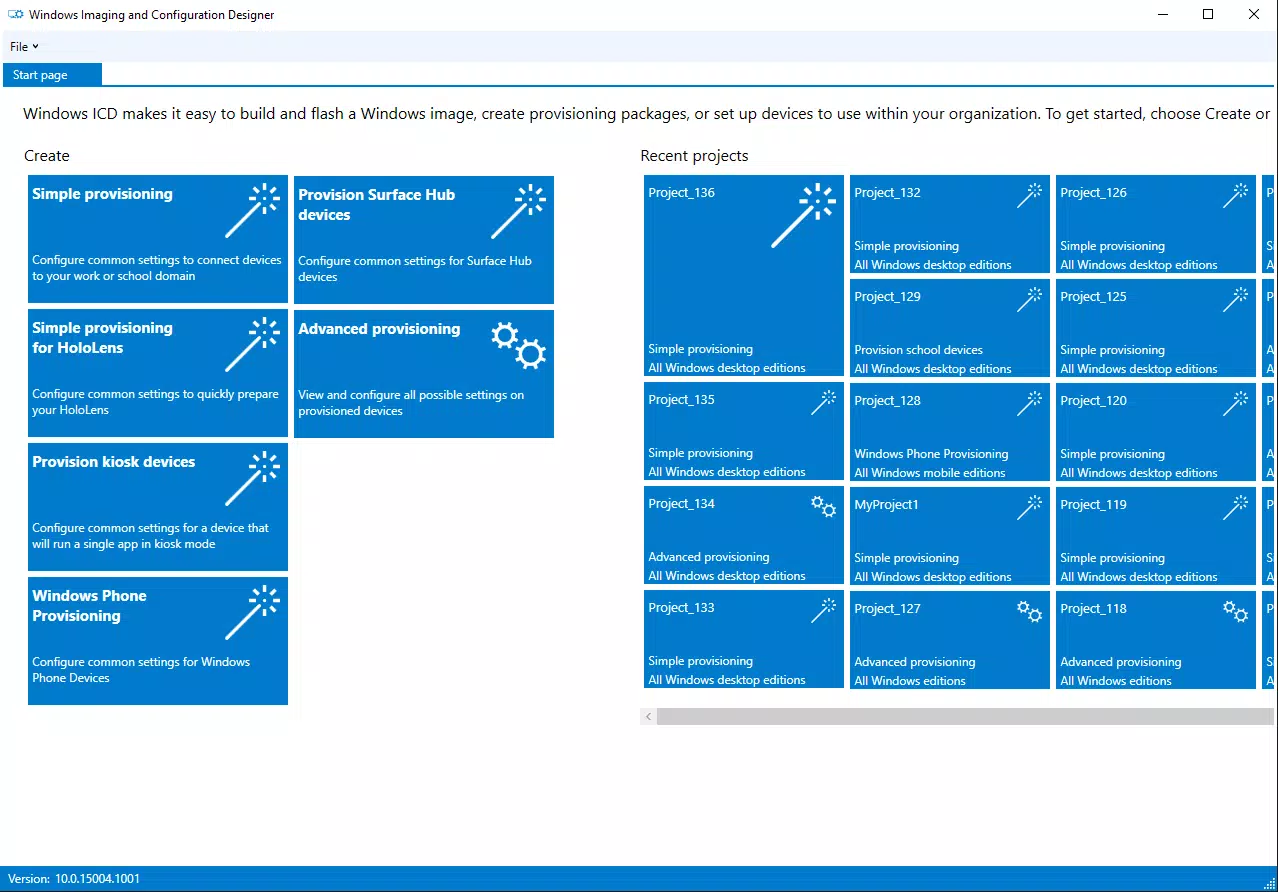
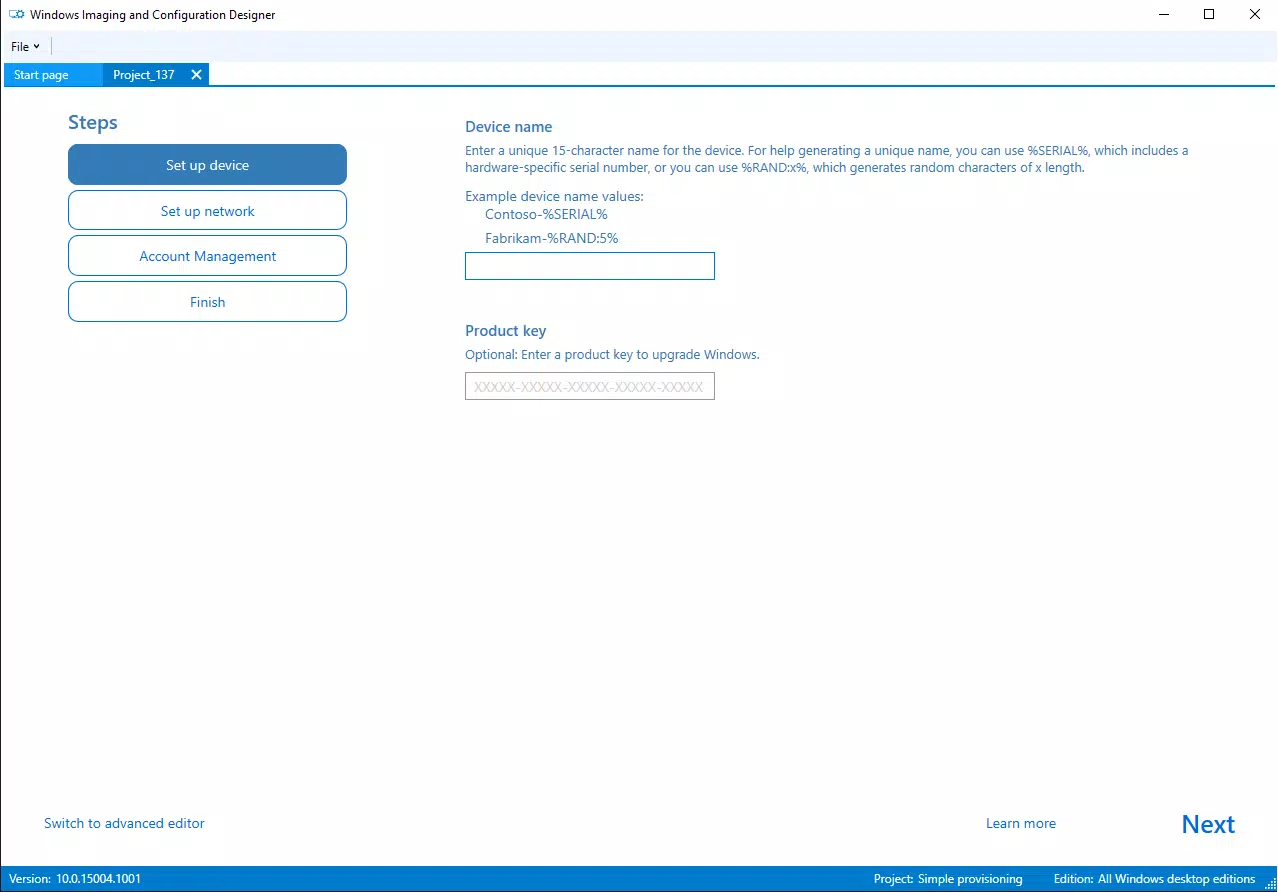
The interface of Windows Configuration Designer is designed with IT professionals in mind, offering a structured and functional layout focused on configuration tasks. The tool presents a hierarchical view of settings, allowing administrators to navigate through categories such as network, identity, and applications with ease. Visual indicators and clear labeling help users identify configuration states, although the interface does not include advanced visual design elements typical of consumer-facing apps.
Navigational flow is linear and task-oriented, guiding users through the creation of configuration profiles. The tool supports saving, exporting, and importing configurations, which is essential for version control and reuse across different device types. While the developer did not list formal performance metrics, the tool operates efficiently within typical enterprise workstations, with minimal latency during profile creation and export.
Responsiveness and stability are consistent across supported Windows environments, though specific requirements were not listed. The application does not exhibit noticeable lag or crashes during normal use, suggesting reliable performance for its intended purpose. Although the tool is not optimized for mobile or touch-based interfaces, it functions well on desktop and laptop systems. The developer did not specify minimum OS requirements or compatibility details beyond the platform.
Platform Compatibility & Technical Requirements
Windows Configuration Designer is available exclusively on the Windows platform. The current version is 1.0.145, with a file size of 34.4 MB. The application is offered free of charge, making it accessible to organizations of all sizes. It is designed to run on Windows operating systems, though the developer did not specify minimum OS requirements or compatibility details for specific Windows editions.
Given its release date of 2016 and continued availability, the tool likely supports modern Windows versions such as Windows 10 and Windows 11. However, compatibility with older or newer versions cannot be confirmed without official documentation. The file size is relatively modest, indicating efficient resource usage and quick installation times. No additional dependencies or third-party components were mentioned.
Pros and Cons
Pros
- Free to download and use, reducing IT operational costs.
- Supports comprehensive device configuration for enterprise deployments.
- Seamless integration with Active Directory and MDM platforms.
- Enables automation of Wi-Fi setup and application installation.
- Designed for IT administrators with a focus on scalability and consistency.
Cons
- Not available on mobile platforms such as Android or iOS.
- Specific system requirements were not disclosed by the developer.
- Interface is functional but lacks modern visual polish.
- May require technical expertise to configure advanced settings.
- Release date indicates it has not seen major updates in years.
FAQ
Is Windows Configuration Designer free to use?
Yes, the tool is available at no cost. It is distributed by Microsoft as a utility for enterprise device management.
Can I use Windows Configuration Designer on macOS or Linux?
No, the application is only compatible with the Windows operating system. It is not available for macOS or Linux platforms.
Does Windows Configuration Designer support Windows 11?
While the developer did not specify compatibility details, the tool is expected to function on Windows 11 systems given its long-standing support for Windows 10 and the shared architecture of modern Windows versions.
How do I install Windows Configuration Designer?
Users can download the application directly from Microsoft’s official resources. The installation process involves running the setup file and following the on-screen instructions.
Is the tool secure for enterprise use?
As a Microsoft-developed utility, Windows Configuration Designer adheres to enterprise security standards. It is designed to handle sensitive configuration data securely, especially when used in conjunction with Active Directory and MDM systems.
Final Thoughts
Windows Configuration Designer remains a valuable tool for IT administrators seeking to standardize and automate the setup of Windows devices. Its ability to pre-configure network settings, enforce policy compliance, and automate software deployment makes it a critical asset in large-scale enterprise environments. While the interface may lack modern design flair and the tool has not seen major updates since 2016, its core functionality continues to serve organizations that prioritize consistency, security, and efficiency in device management.
For IT teams managing fleets of Windows devices, WCD offers a reliable and cost-effective solution to reduce deployment time and minimize errors. It is particularly well-suited for schools, businesses, and government agencies that rely on centralized device control. Despite its age, the tool’s integration with Active Directory, MDM, and application deployment workflows ensures its ongoing relevance.
Download Windows Configuration Designer now to streamline your device setup process and enhance your organization’s IT management capabilities.


